Building Solomon, part 2: accounts, sync and making it yours
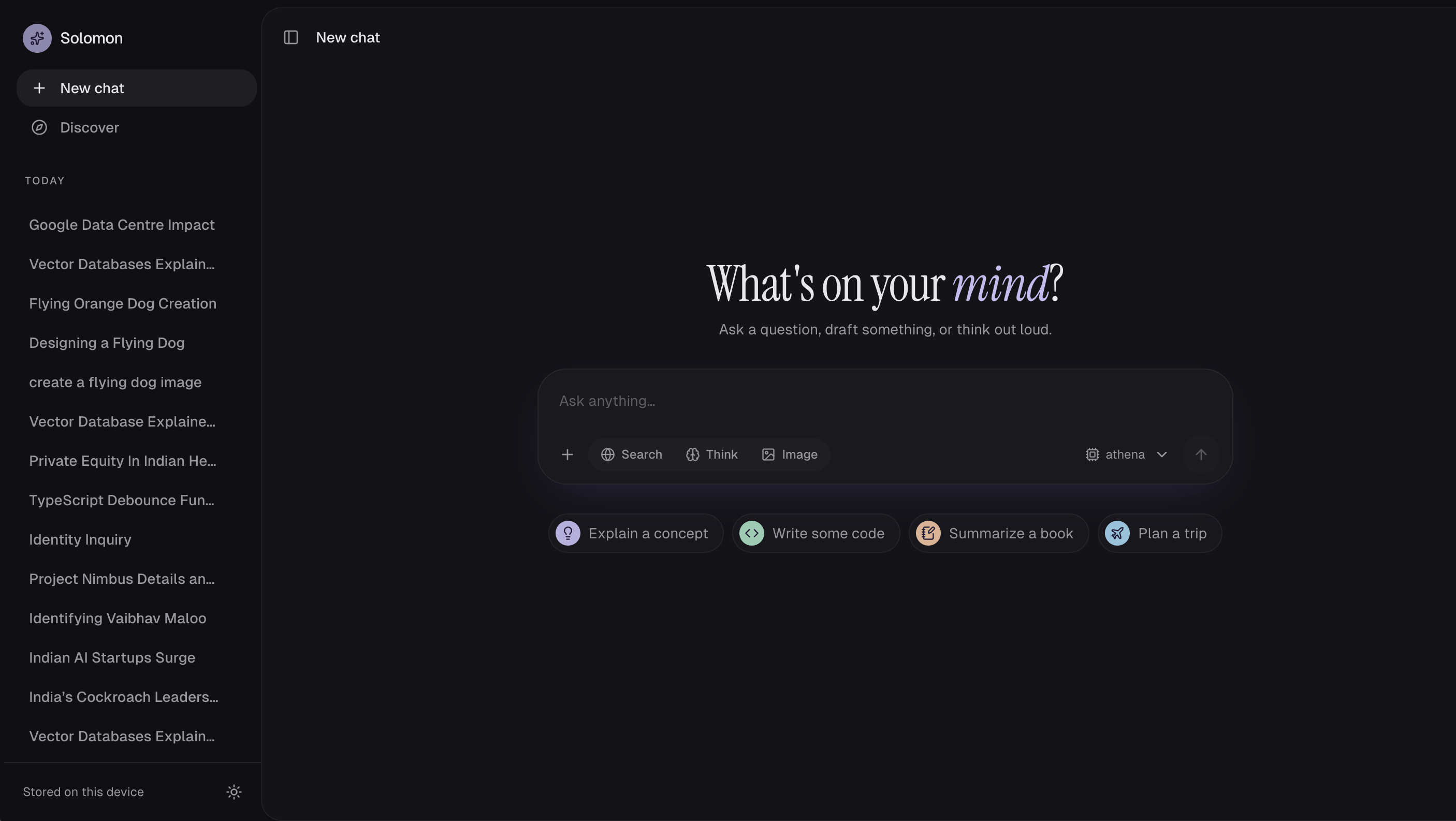
Nine days after part 1, Solomon has real accounts, chats that sync between devices with end-to-end encryption, and an assistant you can shape: its personality, your instructions, projects and a library. It still runs on the same 16 GB laptop.
Did we do what we said?
One of part 1's eight roadmap items shipped, and it grew: accounts came with end-to-end encrypted sync instead of the plain Postgres sync we planned. The rest is still open, and most of this part's work came from using Solomon every day.
| Part 1 roadmap item | Status | What happened |
|---|---|---|
| Accounts and sync | Shipped | Sign-in with email, verification and password reset; chats sync between devices end-to-end encrypted |
| Keys in a KMS | Changed | Synced chats are now encrypted in the browser with a key the server never holds; a KMS still matters for server-side data |
| Recency-aware answers | Open | Not started |
| More resilient search | Open | Not started |
| Richer files | Open | Not started |
| Image editing | Open | Not started; we added two more image models instead |
| Agents and tools | Open | Not started |
| A GPU server | Open | A Caddy gateway is ready for deployment; still on the laptop |
Accounts with end-to-end encrypted sync
Signed-in chats are encrypted in the browser before they leave it, so the server stores and syncs only ciphertext. Part 1 encrypted data on the server with a server-held key; now the server holds no key that can read a synced chat.
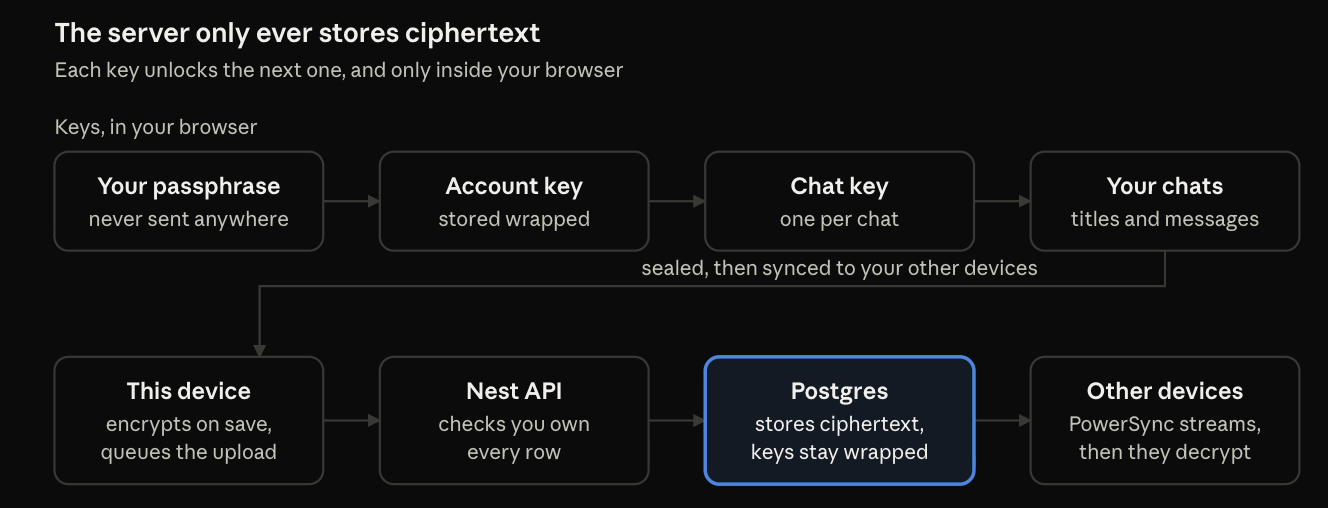
When you create an account you also choose an encryption passphrase, separate from your password. It unlocks a random account key, which unwraps a separate key for each chat. A recovery key is the only way back if you forget the passphrase. Resetting your password never touches your chats.
Sync runs on a self-hosted PowerSync service. Each device keeps a readable copy in IndexedDB and an encrypted mirror in local SQLite; uploads go through the Nest API, which checks that you own every row before writing it. Chats you made while signed out move into your account when you sign up.
Making it yours
Solomon now adapts to the person using it, and those choices follow you to every device.
Six personalities. Balanced, Warm, Witty, Straight-shooter, Mentor and Curious change how replies sound, never what is true. The home screen changes with them: a greeting by your first name and the time of day, its own headline and four suggested prompts.
Custom instructions. Up to 1,500 characters about you or how you want answers, added to every chat.
Response style. Length (concise, balanced, detailed), formatting (plain, balanced, structured) and emoji on or off.
Projects. Folders of chats with shared instructions, like "always give prices in yen" for a trip. Pin chats, move them between projects, and see a project's breadcrumb in each chat.
Profile and My Day. A profile photo, your name and home city; My Day shows the weather where you live, your markets and news on the topics you follow.
Signed out, all of this stays in the browser. When you create an account, what you chose there carries over.
Images: three models, one rule
You can now pick the image model per request. Only one stays in memory at a time, because two would not fit in 16 GB alongside everything else.
| Model | Engine | Size | Typical image |
|---|---|---|---|
| FLUX.2 Klein 4B | MLX (mflux), 4-bit | 4.6 GB | 768×768, 4 steps |
| Stable Diffusion 1.5 | diffusers on Metal, fp16 | 2 GB | 512×512, 30 steps |
| Stable Diffusion XL | diffusers on Metal, fp16 | 7 GB | 1024×1024, 30 steps |
The models run without content filters, because Solomon is also a tool for testing image models. One rule is enforced for every model and has no off switch: prompts that pair a minor with sexual or nude content are refused. We narrowed the check after it blocked harmless prompts like "a girl at the beach"; it now needs a clear sign of a minor, such as an age or "little girl".
Every generated image also lands in a new Library, next to the files you uploaded.
Everything around a reply
Part 1 was about getting a good answer; this part added what you do with it.
| Feature | What it does | Privacy detail |
|---|---|---|
| Model tag | Each reply shows which model wrote it | Synced inside the encrypted message |
| Regenerate | Asks again; earlier answers stay behind a 1/3 switcher with a "Regenerated ×2" tag | Versions sync encrypted |
| Good / bad / report | Thumbs and a report form with reasons | The reply text is sent only if you tick a box |
| Share | A read-only public link to a chat | Publishes an unencrypted copy until you delete the link |
| Library | All generated images and uploaded files | Images are read from your own decrypted chats |
| Usage | Tokens and images per day and per model, over 7, 30 or 90 days | Only counts are stored, never content |
| Data controls | Delete chats, projects, files, images, memories, links or usage, or everything at once | Keeps the account, password and encryption passphrase |
Every destructive action now uses a slide-to-confirm control: a half slide springs back, and keyboard users press Enter on the handle.
How it fits together now
Part 1 had one web app and one AI service; Solomon is now five services behind one gateway, ready to leave the laptop.
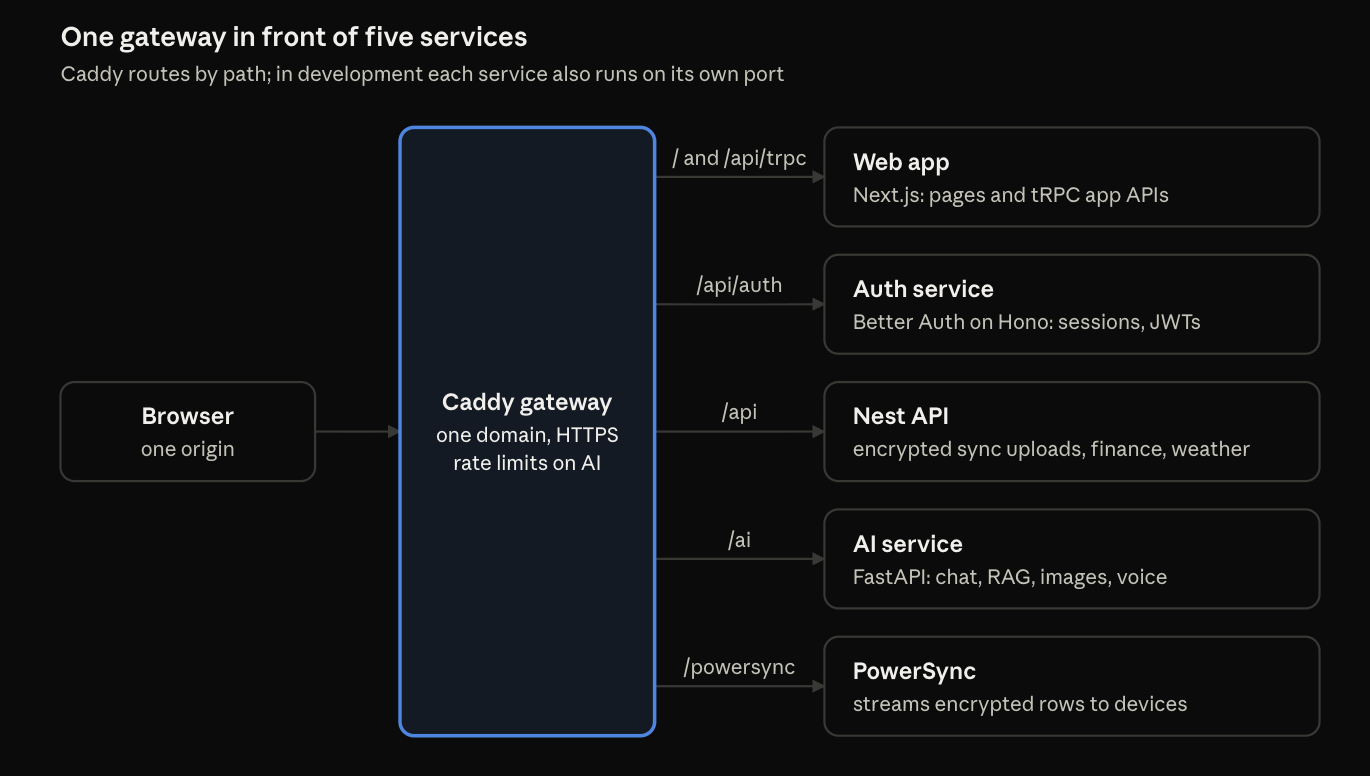
Accounts moved out of the Next.js app into their own small Hono service, so the web app no longer holds any auth secrets. It issues 15-minute signed tokens that the AI service, the Nest API and PowerSync verify on their own. Chat replies still stream straight from the AI service; Caddy passes them through unbuffered, and all services share one Postgres database.
What we learned
The biggest lesson this time: our own defaults can silently overrule the user. Rules like "lead with the answer, skip filler" made the model ignore "always call me Captain" in every test. Saying plainly that the user's instructions come first fixed most of it.
| Problem | What we changed | Result |
|---|---|---|
| Base prompt rules overrode custom instructions | Told the model user instructions win, and moved them to the end of the system prompt | Named address 0/4 → 3/4 replies; "reply in Hindi" 4/4 |
| "Make me a 4-week study plan" generated an image (intent score 0.71 vs a 0.5 cutoff) | Also require a visual word (image, logo, draw, paint) | 0 false triggers on 14 everyday prompts; 8 of 10 real image asks still detected |
| Stable Diffusion 1.5 refused to load an fp16-only download | Load from the local snapshot folder instead of the repo id | Loads offline in a 2 GB download |
| Streams dropped while an image model loaded | Raised the Redis read timeout above the 15 s stream wait | No dropped replies during 30–75 s loads |
| Chat titles came back in ALL CAPS | Sentence case, keeping acronyms like SQL and API | "Mango is delicious", "SQL study plan" |
Two smaller lessons:
Test the flow, not the parts. Every feature here was checked by a browser script that signs up a throwaway user, uses the feature end to end and deletes the user. Several problems only showed up there: the ignored custom instructions above, and a section picker that screen readers announced with no name.
Encryption shapes features. Sharing, feedback and the library all had to answer one question first: what leaves the browser, and does the user know?
What's next Part 3 goes back to the answers themselves, and to leaving the laptop.
Recency-aware answers. Still the top item from part 1: prefer the newest sources and say when they disagree.
A server deployment. The gateway, auth service and sync are ready to run behind one domain with HTTPS; the models need a GPU box.
Reviewing reports. Feedback and reports are stored, but there is no admin view to read and act on them yet.
Files and images. OCR for scanned PDFs, and editing generated images.
Agents and tools. A calculator, database lookups and multi-step tasks in the LangGraph pipeline.
Comments
Join the discussionNo comments yet. Be the first to comment.